EDQS TEL Design Content & Learning Resources Digital Media Studios
Digital Media Studios
- MRCMHR
- Future Students
- JCU Global Experience
- International Students
- Student experience
- Open Day
- How to apply
- Pathways to university
- Living on Campus
- Courses
- Publications
- Mature students
- Scholarships
- Entry options
- JCU Families
- JCU Heroes Programs
- Aboriginal and Torres Strait Islander in Marine Science
- Elite Athletes
- Defence
- Capability.Co
- AI@JCU
- AALL
- Current Students
- Student Ambassador Program
- New students
- JCU Orientation
- LearnJCU
- Placements
-
EDQS
- About EDQS
- Education Strategy
- Teaching@JCU Support
- Assessment@JCU
- Inclusive Subject Design
-
TEL Design
- About LearnJCU
-
Assessment & Feedback
- Artificial Intelligence
- Assessment Tools
- Assessing Group Work
- Assessment Case Studies
- Assessment Methods
- Enable or Disable Submission View
- Inline Marking
- Grade Centre Setup
- Group Assessment Tools
- Marking and Feedback
- Multiple Choice Questions
- One Question at a Time
- Peer Review
- Release Conditions
- Respondus Secure Online Exams
- Respondus FAQs
- Safe Assign
- Save Grade Centre Filtering
- Submission Receipts
- Test Response Download
- Test Settings
- Timezones
- Video Assessment
- Collaboration
- Communication
-
Content & Learning Resources
- Accessibility in LearnJCU
- Banners for Subjects
- Computations
- Content Management
- Digital Media Studios
- DIY Engaging Videos
- Emojis in Ultra Docs
- Exemplars in LearnJCU
- H5P in LearnJCU
- Intro Videos
- Learning Sequence (PDF)
- LearnJCU Content Layout
- Digital Media Support
- LinkedIn Learning
- Mayer's 12 Principles of Multimedia (PDF)
- Media Resources
- Open and Licensed Resources
- Padlet in LearnJCU
- Panopto Video Capture
- PebblePad ePortfolios
- Progress Tracking
- Release Conditions
- Subject Site Checklist
- Organisation & Structure
- Participation & Engagement
- The Learn Lowdown
- Teach with Tech Ebook
- Endorsed technologies
- AI Conversation Tool Program Pilot
- Data & Evaluation
- Student Success
- Development & Recognition
- Unicare Centre and Unicampus Kids
- Graduation
- Off-Campus Students
- JCU Job Ready
- Safety and Wellbeing
- JCU Prizes
- Professional Experience Placement
- Employability Edge
- Art of Academic Writing
- Art of Academic Editing
- Careers and Employability
- Health, Wellbeing and Belonging
- Career Ready Plan
- Careers at JCU
- Partners and Community
- School Outreach and Widening Participation
- Alumni
- International partnerships
- About JCU
- Reputation and Experience
- Chancellery
- Governance
- Celebrating 50 Years
- Academy
- Indigenous Engagement
- Education Division
- Research Festival
- Graduate Research School
- Research Division
- Research and Innovation Services
- CASE
- College of Business, Law and Governance
- College of Healthcare Sciences
- College of Medicine and Dentistry
- College of Science and Engineering
- MPE
- Anthropological Laboratory for Tropical Audiovisual Research (ALTAR)
- Rural Remote and Tropical Health Systems
- Agriculture Technology and Adoption Centre (AgTAC)
- Advanced Analytical Centre
- Australian Institute of Tropical Health and Medicine
- AMHHEC
- Aquaculture Solutions
- AMHRA
- JCU Digital Wellbeing Group
- ARCSTA
- Lions Marine Research Trust
- Australian Tropical Herbarium
- Australian Quantum & Classical Transport Physics Group
- Boating and Diving
- Clinical Psychedelic Research Lab
- Centre for Tropical Biosecurity
- Centre for Tropical Bioinformatics and Molecular Biology
- CITBA
- CMT
- Centre for Disaster Solutions
- CSTFA
- Cyclone Testing Station
- The Centre for Disaster Studies
- Daintree Rainforest Observatory
- Fletcherview
- JCU Eduquarium
- JCU Turtle Health Research
- MARFU
- Orpheus
- TESS
- JCU Ideas Lab
- CADSI
- CNL
- TARL
- eResearch
- Indigenous Education and Research Centre
- Past Course and Subject Handbooks
- Estate
- Work Health and Safety
- Staff
- Discover Nature at JCU
- Cyber Security Hub
- Association of Australian University Secretaries
- Services Division
- Environmental Research Complex [ERC]
- Foundation for Australian Literary Studies
- Gender Equity at JCU
- Give to JCU
- Indigenous Legal Needs Project
- Inherent Requirements
- IsoTropics Lab
- IT Services
- JCU Webinars
- JCU Events
- JCU Motorsports
- JCU Sport
- Library
- Mabo Decision: 30 years on
- Marine Geophysics Laboratory
- Office of the Vice Chancellor and President
- Outstanding Alumni
- Policy
- PAHL
- Queensland Research Centre for Peripheral Vascular Disease
- Rapid Assessment Unit
- RDIM
- Researcher Development Portal
- Roderick Centre for Australian Literature and Creative Writing
- Contextual Science for Tropical Coastal Ecosystems
- State of the Tropics
- Strategic Procurement
- Student profiles
- SWIRLnet
- TREAD
- TropEco for Staff and Students
- TropCOVID: Mapping COVID-19 Immunity in Far North Queensland
- TUDLab
- VAVS Home
- WHOCC for Vector-borne & NTDs
- Media
- Copyright and Terms of Use
- Australian Institute of Tropical Health & Medicine
- JCU Respect
- Pay review
- Research
Recording studio
Create quality digital media for your subject
The use of digital audio and video in learning and teaching has seen significant growth. It is used to orientate students to a subject via introductory videos and also to engage and support students in their learning.
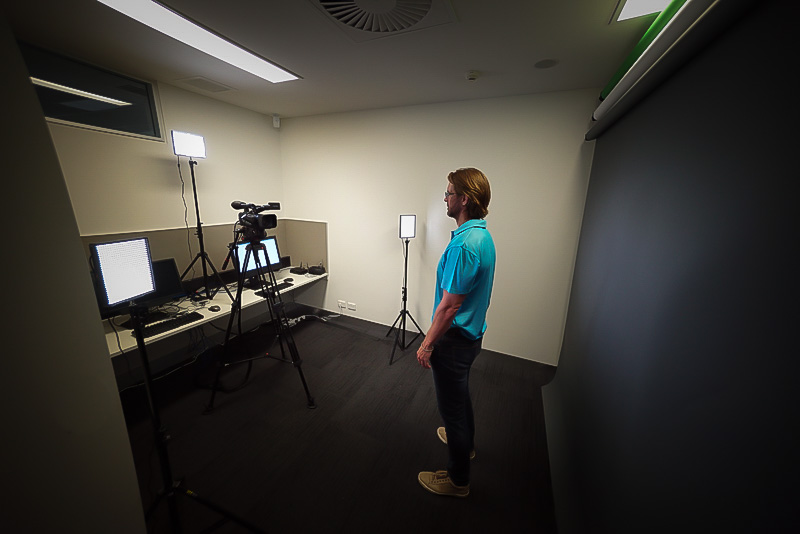
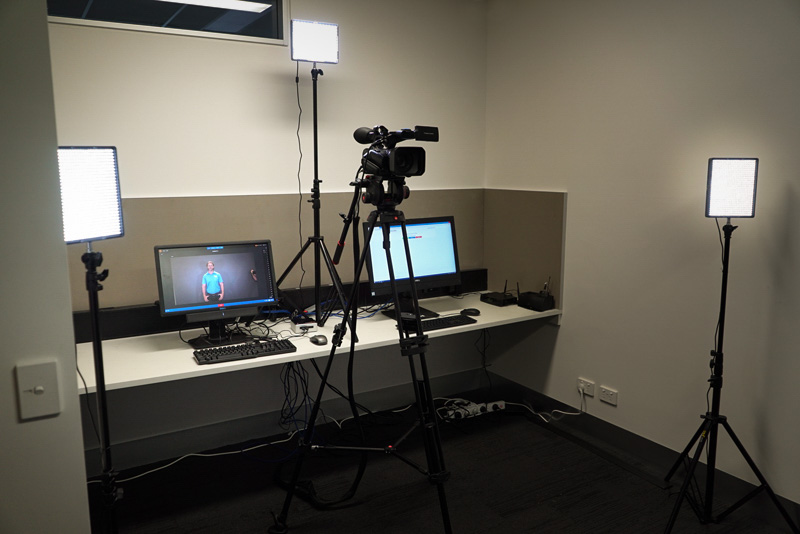
The creative spaces have been designed to help you quickly and easily produce quality recordings.
It's easy to get started
Prepare a script and rehearse
Before booking the studio download an example script (PDF, 65 KB) that highlights the key points to cover in your introductory video. Look at tips on creating an introductory video and don't forget to rehearse.
Tip: Save your script as a Word doc. It can be uploaded to the teleprompter in the studio.
Support
Please let us know about how we can assist with filming and producing your digital media on the studio booking form.
Fashion tip
No logos or fine patterned clothing. Most videos are recorded in front of a dark-grey-screen, if using the green or blue screen avoid wearing greens or blues. If wearing a lapel mic (small mic that clips onto you) take care that your clothing or jewellery is not knocking against it.
When you finish recording, the video will be posted to the designated Subject Video Library in Panopto, JCU's digital media platform. From there, you can bring your media into LearnJCU as described in the 'Share your videos' guide.
Edit videos
You can use the Panopto Editor for minor edits of your video.
Add videos to LearnJCU
Use the 'Add video to content area' or 'Embed video into Ultra Doc' guide.
Available Studios
| Name | Description | Size | Campus |
|---|---|---|---|
| 506.227 | Recording Room | 1 | Townsville Bebegu Yumba |
| 134.120 | Create Studio | 2 | Townsville Bebegu Yumba |
| 302-002 | LEARNING GLASS ROOM | 4 | Townsville Bebegu Yumba |
| A004-222B | LEARNING GLASS ROOM | 4 | Cairns Nguma-bada |
| A004-222C | Create Studio | 2 | Cairns Nguma-bada |
| A004-222D | Recording Room | 1 | Cairns Nguma-bada |
| A004-222E | Recording Room | 1 | Cairns Nguma-bada |
Townsville or Cairns - Book A Digital Media Studio.
Singapore - to book a recording session, please go to the Learning Technologies page.