
RDIM Step 3 - Archive Archiving and Publishing Guide Publish Data
Publish Data
- MRCMHR
- Future Students
- JCU Global Experience
- International Students
- Student experience
- Open Day
- How to apply
- Pathways to university
- Living on Campus
- Courses
- Publications
- Mature students
- Scholarships
- Entry options
- JCU Families
- JCU Heroes Programs
- Aboriginal and Torres Strait Islander in Marine Science
- Elite Athletes
- Defence
- Capability.Co
- AI@JCU
- AALL
- Current Students
- Student Ambassador Program
- New students
- JCU Orientation
- LearnJCU
- Placements
- EDQS
- Unicare Centre and Unicampus Kids
- Graduation
- Off-Campus Students
- JCU Job Ready
- Safety and Wellbeing
- JCU Prizes
- Professional Experience Placement
- Employability Edge
- Art of Academic Writing
- Art of Academic Editing
- Careers and Employability
- Health, Wellbeing and Belonging
- Career Ready Plan
- Careers at JCU
- Partners and Community
- School Outreach and Widening Participation
- Alumni
- International partnerships
- About JCU
- Reputation and Experience
- Chancellery
- Governance
- Celebrating 50 Years
- Academy
- Indigenous Engagement
- Education Division
- Research Festival
- Graduate Research School
- Research Division
- Research and Innovation Services
- CASE
- College of Business, Law and Governance
- College of Healthcare Sciences
- College of Medicine and Dentistry
- College of Science and Engineering
- MPE
- Anthropological Laboratory for Tropical Audiovisual Research (ALTAR)
- Rural Remote and Tropical Health Systems
- Agriculture Technology and Adoption Centre (AgTAC)
- Advanced Analytical Centre
- Australian Institute of Tropical Health and Medicine
- AMHHEC
- Aquaculture Solutions
- AMHRA
- JCU Digital Wellbeing Group
- ARCSTA
- Lions Marine Research Trust
- Australian Tropical Herbarium
- Australian Quantum & Classical Transport Physics Group
- Boating and Diving
- Clinical Psychedelic Research Lab
- Centre for Tropical Biosecurity
- Centre for Tropical Bioinformatics and Molecular Biology
- CITBA
- CMT
- Centre for Disaster Solutions
- CSTFA
- Cyclone Testing Station
- The Centre for Disaster Studies
- Daintree Rainforest Observatory
- Fletcherview
- JCU Eduquarium
- JCU Turtle Health Research
- MARFU
- Orpheus
- TESS
- JCU Ideas Lab
- CADSI
- CNL
- TARL
- eResearch
- Indigenous Education and Research Centre
- Past Course and Subject Handbooks
- Estate
- Work Health and Safety
- Staff
- Discover Nature at JCU
- Cyber Security Hub
- Association of Australian University Secretaries
- Services Division
- Environmental Research Complex [ERC]
- Foundation for Australian Literary Studies
- Gender Equity at JCU
- Give to JCU
- Indigenous Legal Needs Project
- Inherent Requirements
- IsoTropics Lab
- IT Services
- JCU Webinars
- JCU Events
- JCU Motorsports
- JCU Sport
- Library
- Mabo Decision: 30 years on
- Marine Geophysics Laboratory
- Office of the Vice Chancellor and President
- Outstanding Alumni
- Policy
- PAHL
- Queensland Research Centre for Peripheral Vascular Disease
- Rapid Assessment Unit
-
RDIM
- Introduction
- RDIM Overview
- My Responsibilities
- Research Data JCU Platform
- Step 1 - Plan
- Step 2 - Manage
- Step 3 - Archive
- Step 4 - Publish
- Step 5 - Reuse
- Step 6 - Review
- Step 7 - Dispose
-
Terminology
- Access Conditions (Open, Conditional, Restricted)
- Active Data
- Active Storage and Collaboration Options
- Citations
- Collaborator
- Completed Data
- Conditional Access
- Confidentiality
- Consent
- Contracts
- Copyright
- Creative Commons Licence
- Creative Commons Zero (CC0)
- Custodian
- Custodianship
- Data
- Data Creator
- Data Custodian
- Data Manager
- Digital Object Identifier (DOI)
- Data Package
- Data Papers
- Data Publication
- Data Record
- Data Repositories
- Data Retention
- Data Storage - Active Data or Working Data
- Data Storage - Completed Data
- Data Visualisation
- Data Wrangling (Cleaning)
- De-identifying Data
- Digital Object Identifier (DOI)
- DIKW Model
- Documentation
- DOI Minting Services
- Embargo
- Ethics and Ethical Clearance
- FAIR Data Principles
- File Formats
- File Names
- Folder Structures
- HDR Candidate
- Information
- Intellectual Property
- JCU Researcher
- Lead Investigator
- Moral Rights
- Open Access
- Primary Advisor
- Primary Materials
- Privacy and Personal Information
- Repositories
- Research Data
- Research (Data and Information) Asset
- Research (Data and Information) Asset Lifecycle
- Research Data JCU Platform
- Research Data Management Plan (RDMP)
- Research Information
- Research Project
- Restricted Access
- Retention
- Retention Rules for Specific Data Types
- Sensitive Data
- Storage
- Supporting Documents
- Triangulation, Data Linkage and Integrating Authorities
- Version Control
- Working Data
- Wrangling (Cleaning) Data
- Frequently Asked Questions
- Information Sheets
- Training Videos
- Site Map
- Contact Us
- Researcher Development Portal
- Roderick Centre for Australian Literature and Creative Writing
- Contextual Science for Tropical Coastal Ecosystems
- State of the Tropics
- Strategic Procurement
- Student profiles
- SWIRLnet
- TREAD
- TropEco for Staff and Students
- TropCOVID: Mapping COVID-19 Immunity in Far North Queensland
- TUDLab
- VAVS Home
- WHOCC for Vector-borne & NTDs
- Media
- Copyright and Terms of Use
- Australian Institute of Tropical Health & Medicine
- JCU Respect
- Pay review
- Research
Start Here: Archive Before You Publish
🔙 Back to Table of Contents
🖨️ Save or Print: You can save or print this page as a PDF using Ctrl+P (Windows) or Cmd+P (Mac).
🛑You can’t publish without archiving first!
All Data Publications in Research Data JCU are created from a non-public Data Record. This supports research integrity by ensuring your data is properly archived, documented, and traceable.
🔗 Jump to: How to Create a Data Record or visit the full Archive Data page.
Data Publications (metadata) are harvested by Research Data Australia, Google Dataset Search and other discovery platforms—so others can find and cite your work more easily.
🌟Benefits of data sharing
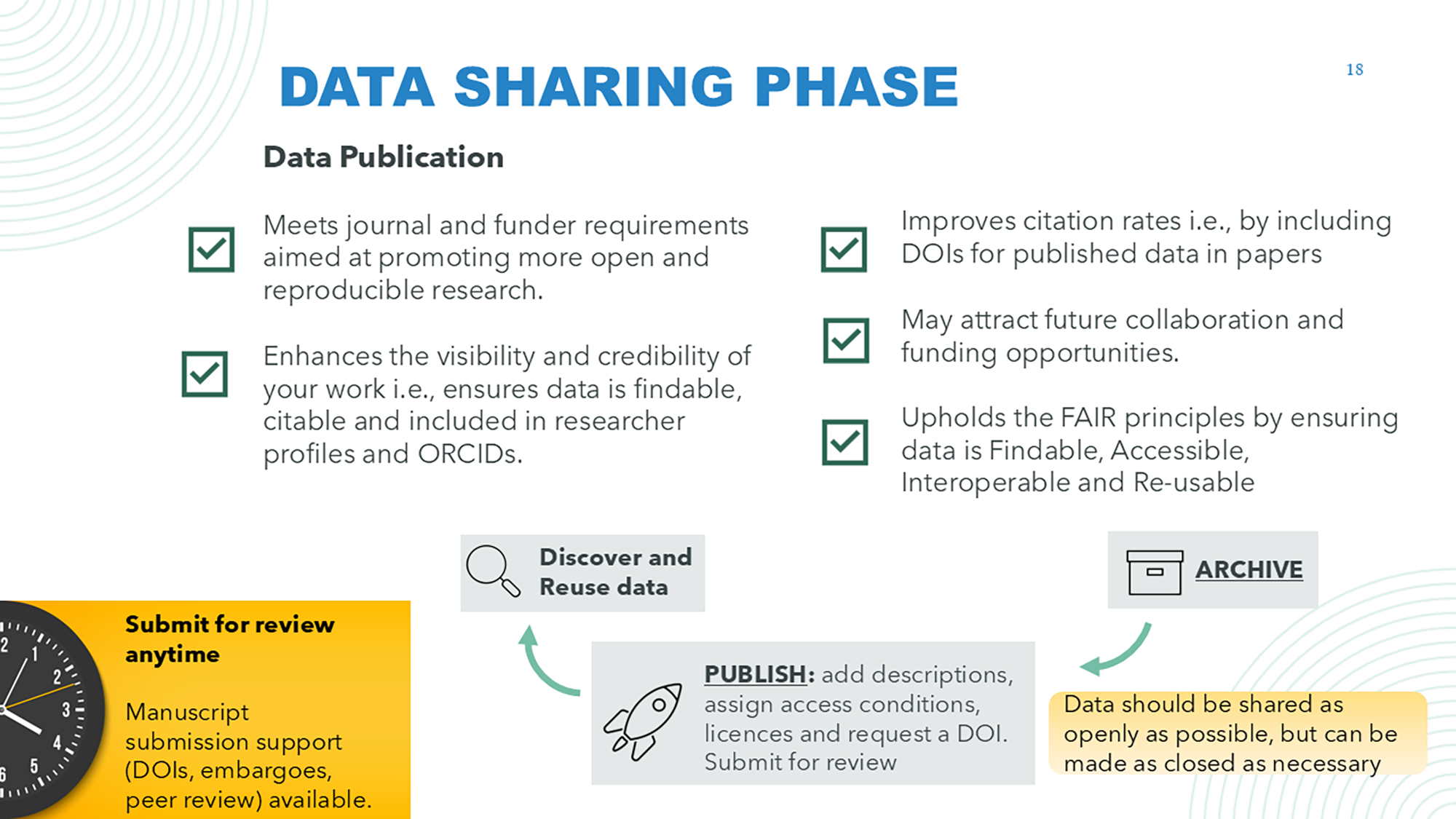
We highly recommend publishing your data. It increases the visibility and impact of your work, supports transparency and reproducibility, and allows others to build on your research.
The slide below (from the RTN workshop) explains why data sharing matters. We explore the many benefits—for your career, research progress, and society—in more detail on our website:
🔗 Benefits of data management and sharing
You can do this by:
- Converting a Data Record to one or more Data Publications in Research Data JCU
- Publishing in an external repository (e.g., Dryad, GenBank)
Note: If you publish elsewhere, record the link in your JCU Data Record.
You can also create a Data Publication and have it appear in your JCU researcher portfolio (GECO).
We have a Knowledge Base Article on this topic:
🔐 ServiceNow (login required):
Knowledge Base Article – Manage Research Data Published Elsewhere Using Research Data JCU
The next section of the Guide covers three key topics:
- Ethical and legal limits on data sharing
- DOIs and support for manuscript submission
- Tips on describing your data, choosing access conditions and selecting a licence.
🔙 Back to Table of Contents
Ethical and Legal Limits on Data Sharing
You may need to limit data access due to ethics, intellectual property, or confidentiality concerns. If your data can’t be shared (Open or Conditional access), consider creating a metadata-only Data Publication to “advertise” your work. We don’t mint DOIs for these records as the data itself is not part of the ‘scholarly record,’ but other researchers may still discover your work and contact you for collaboration or further information.
Always check your ethics approval to confirm that data sharing (even for de-identified data and conditional access) is permitted.
DOIs and Manuscript Submissions
Research Data JCU mints draft DOIs (Digital Object Identifiers) automatically when you submit a Data Publication for review with the “Request a DOI” box ticked. Go to “My Reviewing Records” to see the DOI (in the Citation tab) and share it with your journal. The link will not be active until the Data Publication is published or (if you have set one) the embargo is lifted.
You can apply an embargo (in the Submit tab) or ask us to organise anonymous peer review to support journal submissions.
✉️ Email researchdata@jcu.edu.au so we can prioritise peer review requests.
🔗 Find out more about Data Citation
How to Describe Your Data, Choose Access Conditions and Select a Licence
These are some of the most common questions we receive—here are a few tips to help.
1. Describe Your Data
What to include in your dataset description:
The default information is pre-filled from your Data Record. Update it as required (e.g. if you are publishing a subset of the data associated with your Data Record or research project then the description should reflect this) and ensure it is sufficiently detailed for other researchers to discover and interpret/re-use your data correctly.
The description should include:
- Why the data was collected—the aims and/or research context
- How the data was collected and processed—for example:
- sampling methods
- instrument calibrations
- how measurements were taken
- how data was processed, analysed, or cleaned
Note: If you completed the “Software/equipment used to create/collect the data” or “Software/equipment used to manipulate/analyse the data” fields in Data Record, this text will be automatically added to your description — but you can edit it!
- What the dataset includes, for example:
- Types of files (e.g., transcripts, recordings, spreadsheets etc.), file structures, and formats
- Data variables, including coding schemes and units.
- Access conditions if appropriate (e.g., mixed methods example below)
If you haven’t already, upload supporting documentation such as a README, codebook, R scripts, or embed a key directly in your dataset to explain variables and structure.
Note: You will need to add any new files to your Data Record, then return to your Data Publication and click “Refresh data from related Data Record” in the Select data tab.
Why is this a bit fiddly?
Because the Data Record is the archive—it stores the actual files. The Data Publication simply points to those files and wraps them in a public-facing description. Once submitted, you can’t edit the publication yourself—but we can update it for you (e.g. to add a link to your paper).
If in doubt, just email us the files and we’ll upload or update them for you!
2. Choose Access Conditions
How to select the right level of access for your data:
Your metadata record (Data Publication) is always public, but the actual data files (attachments, links or file paths) can be shared in different ways. You can choose from three levels of access depending on sensitivity and ethics approval.
- Open – freely available for download
- Conditional – access granted on request (we mediate requests with the Data Manager)
- Restricted – metadata only; files are not accessible
If you followed the steps to organise your data by sensitivity and archive it appropriately, you can now choose what to publish—and how.
When creating your Data Publication:
- Use the drop-down in the Select data tab to choose the access condition that best applies to your dataset as a whole
- You can also apply different access levels to individual files, links, or file paths:
✅ Tick the boxes to make a file open
⛔ Leave it unticked to keep the file hidden (used for conditional or restricted access, or if data is stored elsewhere and only a file path is included)
🧩Example: Mixed Methods Dataset with Different Access Levels
Here’s how you might describe access conditions for different parts of your dataset, based on sensitivity:
This dataset includes:
- Open access files: Interview guide (.pdf) and codebook (.xlsx and .ods formats)
- Conditional access files: De-identified survey data in both .sav (SPSS) and .csv formats
- Restricted files: Video interview recordings (.flac) and transcripts (.docx and PDF)
💡 Tip: Including this type of detail in your dataset description helps others understand what is available and under what terms.
💡 Usability reminder: Where possible, provide both an open and a proprietary format (e.g., .csv and .sav). This supports long-term access and reuse while preserving original formats.
⚠️ The Access Conditions you apply to your data must align with ethics approvals and consent type.
🔗 Refer to our website for more information about Consent and Access Conditions & Consent Types (scroll down)
3. Select a Licence
Choosing how others can reuse your data:
Licensing your data ensures others know how they can reuse it and that you are properly credited (e.g., the BY condition in Creative Commons licences ensures attribution). You must select a licence even if your data is only available via conditional access—it will apply if/when access is granted.
- The most common licences can be selected from a drop-down menu in the metadata form.
- Other licences (e.g. GNU, MIT) can be added as free text—these are often used for software.
- We recommend an open licence such as CC BY to support FAIR data and enable reuse—but the final choice is up to you and your advisors.
- Some journals have licence restrictions. For example, PLOS will not accept data under CC BY-ND (no derivatives), as it blocks reuse in meta-analyses.
🔗 Useful links:
🖨️ Save or Print: You can save or print this page as a PDF using Ctrl+P (Windows) or Cmd+P (Mac).
🔙 Back to Table of Contents