
RDIM Step 1 - Plan Research Data Management Plan (RDMP) Guide Overview & Getting Started
Overview & Getting Started
- MRCMHR
- Future Students
- JCU Global Experience
- International Students
- Student experience
- Open Day
- How to apply
- Pathways to university
- Living on Campus
- Courses
- Publications
- Mature students
- Scholarships
- Entry options
- JCU Families
- JCU Heroes Programs
- Aboriginal and Torres Strait Islander in Marine Science
- Elite Athletes
- Defence
- Capability.Co
- AI@JCU
- AALL
- Current Students
- Student Ambassador Program
- New students
- JCU Orientation
- LearnJCU
- Placements
- EDQS
- Unicare Centre and Unicampus Kids
- Graduation
- Off-Campus Students
- JCU Job Ready
- Safety and Wellbeing
- JCU Prizes
- Professional Experience Placement
- Employability Edge
- Art of Academic Writing
- Art of Academic Editing
- Careers and Employability
- Health, Wellbeing and Belonging
- Career Ready Plan
- Careers at JCU
- Partners and Community
- School Outreach and Widening Participation
- Alumni
- International partnerships
- About JCU
- Reputation and Experience
- Chancellery
- Governance
- Celebrating 50 Years
- Academy
- Indigenous Engagement
- Education Division
- Research Festival
- Graduate Research School
- Research Division
- Research and Innovation Services
- CASE
- College of Business, Law and Governance
- College of Healthcare Sciences
- College of Medicine and Dentistry
- College of Science and Engineering
- MPE
- Anthropological Laboratory for Tropical Audiovisual Research (ALTAR)
- Rural Remote and Tropical Health Systems
- Agriculture Technology and Adoption Centre (AgTAC)
- Advanced Analytical Centre
- Australian Institute of Tropical Health and Medicine
- AMHHEC
- Aquaculture Solutions
- AMHRA
- JCU Digital Wellbeing Group
- ARCSTA
- Lions Marine Research Trust
- Australian Tropical Herbarium
- Australian Quantum & Classical Transport Physics Group
- Boating and Diving
- Clinical Psychedelic Research Lab
- Centre for Tropical Biosecurity
- Centre for Tropical Bioinformatics and Molecular Biology
- CITBA
- CMT
- Centre for Disaster Solutions
- CSTFA
- Cyclone Testing Station
- The Centre for Disaster Studies
- Daintree Rainforest Observatory
- Fletcherview
- JCU Eduquarium
- JCU Turtle Health Research
- MARFU
- Orpheus
- TESS
- JCU Ideas Lab
- CADSI
- CNL
- TARL
- eResearch
- Indigenous Education and Research Centre
- Past Course and Subject Handbooks
- Estate
- Work Health and Safety
- Staff
- Discover Nature at JCU
- Cyber Security Hub
- Association of Australian University Secretaries
- Services Division
- Environmental Research Complex [ERC]
- Foundation for Australian Literary Studies
- Gender Equity at JCU
- Give to JCU
- Indigenous Legal Needs Project
- Inherent Requirements
- IsoTropics Lab
- IT Services
- JCU Webinars
- JCU Events
- JCU Motorsports
- JCU Sport
- Library
- Mabo Decision: 30 years on
- Marine Geophysics Laboratory
- Office of the Vice Chancellor and President
- Outstanding Alumni
- Policy
- PAHL
- Queensland Research Centre for Peripheral Vascular Disease
- Rapid Assessment Unit
-
RDIM
- Introduction
- RDIM Overview
- My Responsibilities
- Research Data JCU Platform
- Step 1 - Plan
- Step 2 - Manage
- Step 3 - Archive
- Step 4 - Publish
- Step 5 - Reuse
- Step 6 - Review
- Step 7 - Dispose
-
Terminology
- Access Conditions (Open, Conditional, Restricted)
- Active Data
- Active Storage and Collaboration Options
- Citations
- Collaborator
- Completed Data
- Conditional Access
- Confidentiality
- Consent
- Contracts
- Copyright
- Creative Commons Licence
- Creative Commons Zero (CC0)
- Custodian
- Custodianship
- Data
- Data Creator
- Data Custodian
- Data Manager
- Digital Object Identifier (DOI)
- Data Package
- Data Papers
- Data Publication
- Data Record
- Data Repositories
- Data Retention
- Data Storage - Active Data or Working Data
- Data Storage - Completed Data
- Data Visualisation
- Data Wrangling (Cleaning)
- De-identifying Data
- Digital Object Identifier (DOI)
- DIKW Model
- Documentation
- DOI Minting Services
- Embargo
- Ethics and Ethical Clearance
- FAIR Data Principles
- File Formats
- File Names
- Folder Structures
- HDR Candidate
- Information
- Intellectual Property
- JCU Researcher
- Lead Investigator
- Moral Rights
- Open Access
- Primary Advisor
- Primary Materials
- Privacy and Personal Information
- Repositories
- Research Data
- Research (Data and Information) Asset
- Research (Data and Information) Asset Lifecycle
- Research Data JCU Platform
- Research Data Management Plan (RDMP)
- Research Information
- Research Project
- Restricted Access
- Retention
- Retention Rules for Specific Data Types
- Sensitive Data
- Storage
- Supporting Documents
- Triangulation, Data Linkage and Integrating Authorities
- Version Control
- Working Data
- Wrangling (Cleaning) Data
- Frequently Asked Questions
- Information Sheets
- Training Videos
- Site Map
- Contact Us
- Researcher Development Portal
- Roderick Centre for Australian Literature and Creative Writing
- Contextual Science for Tropical Coastal Ecosystems
- State of the Tropics
- Strategic Procurement
- Student profiles
- SWIRLnet
- TREAD
- TropEco for Staff and Students
- TropCOVID: Mapping COVID-19 Immunity in Far North Queensland
- TUDLab
- VAVS Home
- WHOCC for Vector-borne & NTDs
- Media
- Copyright and Terms of Use
- Australian Institute of Tropical Health & Medicine
- JCU Respect
- Pay review
- Research
🚀 In this section, we’ll walk you through:
- What an RDMP is (and isn’t) and why it's important
- What you'll need to get started
- How to create your RDMP using the Research Data JCU platform
🔙 Back to Table of Contents
🖨️ Save or Print: You can save or print this page as a PDF using Ctrl+P (Windows) or Cmd+P (Mac).
What is an RDMP and Why Do I Need One?
Your RDMP is a practical tool that helps you plan how your research data will be created, stored, accessed, and shared—during your project and beyond. It acts as a blueprint linking your research to the data it generates.
It’s a living document, updated as your project evolves—for example, when new team members join, storage needs change, or you receive ethics approval or funding.
How It Fits into the Bigger Picture
At JCU, your RDMP supports research data across the full research data lifecycle:
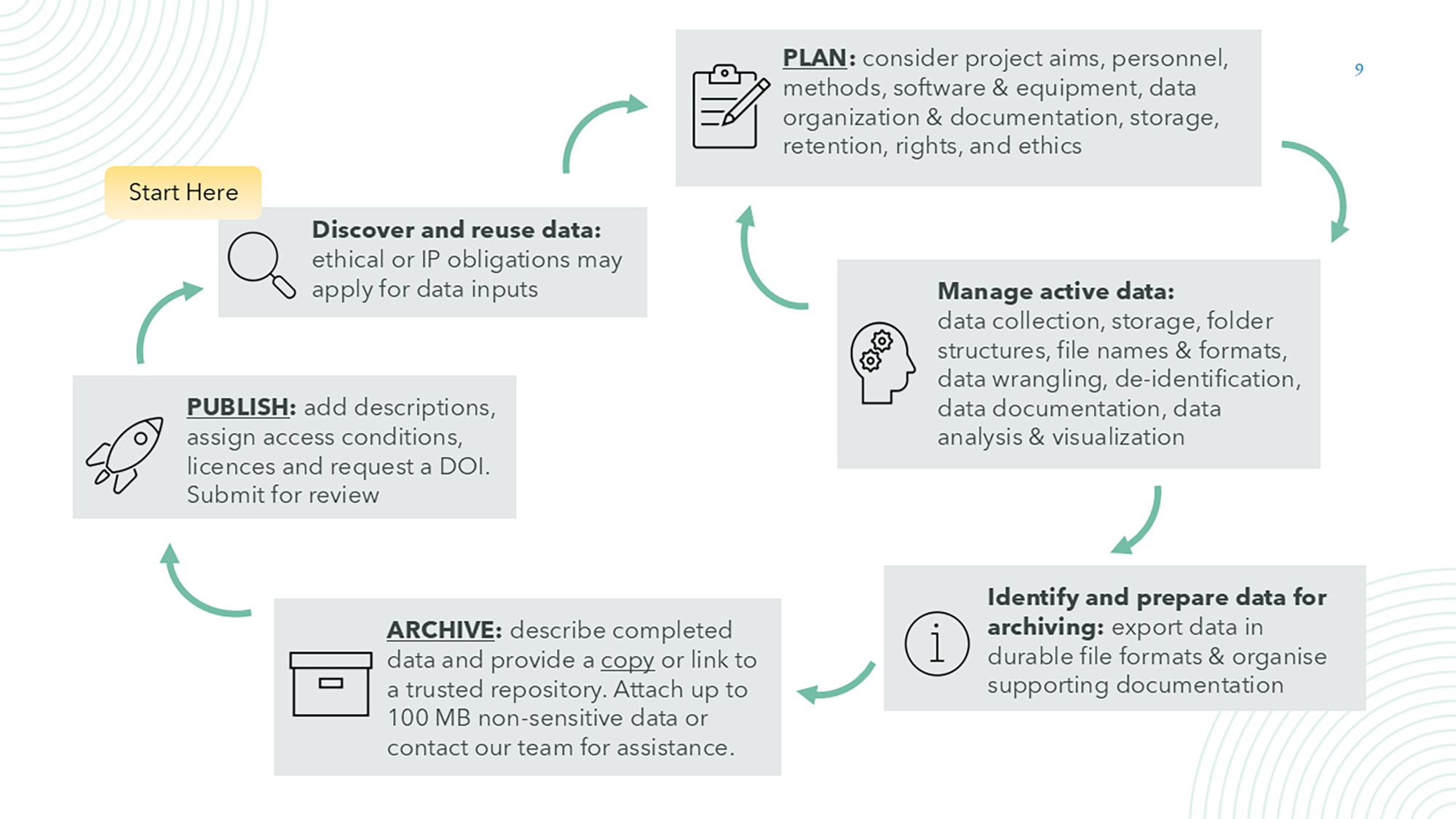
The Research Data Management Plan (RDMP) is more than a form—it helps you think through how data will be handled at every stage of your research:
- Discover and reuse data: If you're using existing data, your RDMP prompts you to consider licensing, attribution, ethical use, and data-sharing agreements.
- Plan: Your RDMP is the cornerstone of good data management. It helps identify key decisions early.
- Manage active data: The RDMP supports day-to-day data handling and can be updated throughout the project.
- Archive and Publish: Planning ahead makes it easier to archive and share your data later. See the Archiving and Publishing Guide.
Why Create an RDMP?
✴️ To meet ethics and funding requirements
Required by the National Statement, JCU HREC, and most funders (e.g. ARC—by project commencement).
✴️ To support ethics, protocols, or grant applications
Export your RDMP as a PDF and attach it to submissions
✴️ To meet HDR milestones
An RDMP is mandatory for Confirmation of Candidature at JCU.
✴️ To reduce risk
Helps prevent data loss, misuse, and ethical or legal breaches.
✴️ To save time and support integrity
Makes it easier to manage and prepare your data for reuse.
✴️ To streamline archiving
Pre-fills project metadata into your Data Record.
What You’ll Need to Create Your RDMP
Getting started on your RDMP can be quick—just 10–15 minutes—but allow up to 30–60 minutes if you’re completing it in full, for example for ethics or funding applications.
You don’t need everything upfront. You’re not committing to fixed answers—you’re recording your current plans, which you can refine as needed.
Helpful information to gather beforehand:
- Project title
- Description outlining the purpose and goals of your research
💡 Tip: You can often copy this (and your methods) from your proposal! - Fields of Research (FoR) and Socio-Economic Objective (SEO) codes.
- Funding or contract details— including any data-sharing agreements
- Data collection methods (even if still being finalised)
- Software or tools you plan to use
Using the Research Data JCU Platform

❓Need help with Research Data JCU? Jump to our Troubleshooting Guide!
You’ll use the Research Data JCU platform to create a RDMP and a Data Record—this guide covers both:
🔍 Not sure how a RDMP is different from a Data Record? Here's a quick comparison:
RDMPs vs. Data Records: What's the Difference?
RDMP | Data Record | |
|---|---|---|
Purpose | Project-level planning tool | Archival metadata record describes completed data |
When to create | Start of the project | Whenever data is ready to archive |
Data storage | Describes where active data will be kept | Stores or links to completed data |
Editable? | Yes—update as the project evolves | Technically yes, but discouraged once archived (to preserve integrity) |
Metadata Relationship | Feeds into Data Record | Builds on RDMP (some fields pre-fill) |
❓Troubleshooting Guide
Can’t see existing records?
This sometimes happens when your student identity transitions to a staff account—a common occurrence with short-term contracts. It's an easy fix, but we know it’s frustrating.
✉️ Email: researchdata@jcu.edu.au and we’ll sort it out quickly.
Trouble saving your RDMP or Data Record?
You must complete the following fields before saving:
- Project Name (Project tab for RDMP, Why? tab for Data Record)
- Lead Investigator (People tab for RDMP, Who? tab for Data Record)
- Data sensitivity question (RDMP only—new)
If you see an incomplete error message, double-check these fields.
Still stuck? Don’t worry—just contact the Research Data team and we’ll help.
How to login:
- Click on Research Data JCU
- Select the (green) centre tile, Access Research Data JCU
- First time users will be invited to Login to Federated Services (AAF)
- Select James Cook University as your organisation
- You will be presented with the JCU single-sign on screens, log in as usual.
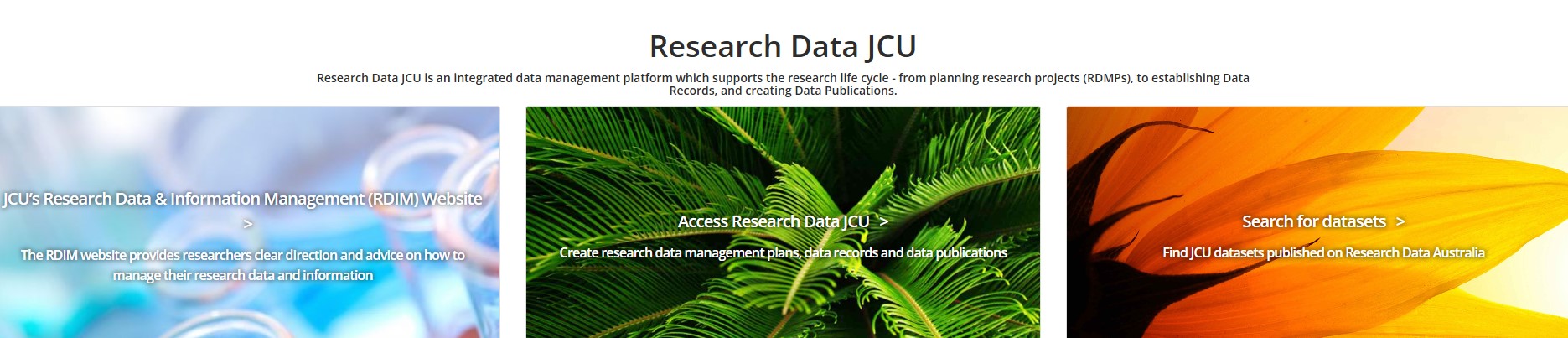
Once logged in, the platform includes built-in help text (click on the ? icon) and prompts to guide you through each metadata field.
Access varies by role—some have edit access, others can only view the record.
🔗 Review roles and access permissions information for full details.
How to Create a RDMP:
- Select PLAN and then CREATE RESEARCH DATA MANAGEMENT PLAN (RDMP) from the menu, OR
- Select Create Research Data Management Plan (RDMP) from the Plan tile
🔗 Creating a RDMP (with screenshots)
(Visit this page for a visual guide and screenshots, if you need additional assistance)
When you're ready to archive completed data you can easily create a Data Record from your RDMP! Visit this page in the Archiving and Publishing Guide for instructions.
🖨️ Save or Print: You can save or print this page as a PDF using Ctrl+P (Windows) or Cmd+P (Mac).
🔙 Back to Table of Contents