
Current Students The Learning Centre Resources AI for university study Practical skills for using AI in your studies
Practical skills for using AI in your studies
- MRCMHR
- Future Students
- JCU Global Experience
- International Students
- Student experience
- Open Day
- How to apply
- Pathways to university
- Living on Campus
- Courses
- Publications
- Mature students
- Scholarships
- Entry options
- JCU Families
- JCU Heroes Programs
- Aboriginal and Torres Strait Islander in Marine Science
- Elite Athletes
- Defence
- Capability.Co
- AI@JCU
- AALL
-
Current Students
- Current International students
-
Enrolment
- Enrol online
- New students enrol
- Course Enrolment Planners
- Change course (Variation to Study)
- Return to study (Variation to Study)
- Transfer campus (Variation to Study)
- Withdraw from subjects or your course
- Applying for Credit
- Student Centre and Enrolment Team Contacts
- Enrolment Terminology
- JCU Flex FAQs
-
Fees & Financial Support
- Domestic undergraduate subject fees
- Financial support
- Defer your fees
- Pay your fees
- SLE & HELP Balance
- Student Services and Amenities Fee (SSA Fee)
- Postgraduate subject fees
- Commonwealth Prac Payment
- Refunds and withdrawal under special circumstances
- Penalties for unpaid fees and late withdrawals
- Incidental & Administration Fees
- Eligibility Conditions for Commonwealth Assistance
- Unique Student Identifier (USI)
- Class Registration
- Assessment and results
- Support
- Academic Calendars
- Student Life
- Learning Online
- The Learning Centre
- Forms
- Safety
- Student Ambassador Program
- New students
- JCU Orientation
- LearnJCU
- Placements
- EDQS
- Unicare Centre and Unicampus Kids
- Graduation
- Off-Campus Students
- JCU Job Ready
- Safety and Wellbeing
- JCU Prizes
- Professional Experience Placement
- Employability Edge
- Art of Academic Writing
- Art of Academic Editing
- Careers and Employability
- Health, Wellbeing and Belonging
- Career Ready Plan
- Careers at JCU
- Partners and Community
- School Outreach and Widening Participation
- Alumni
- International partnerships
- About JCU
- Reputation and Experience
- Chancellery
- Governance
- Celebrating 50 Years
- Academy
- Indigenous Engagement
- Education Division
- Research Festival
- Graduate Research School
- Research Division
- Research and Innovation Services
- CASE
- College of Business, Law and Governance
- College of Healthcare Sciences
- College of Medicine and Dentistry
- College of Science and Engineering
- MPE
- Anthropological Laboratory for Tropical Audiovisual Research (ALTAR)
- Rural Remote and Tropical Health Systems
- Agriculture Technology and Adoption Centre (AgTAC)
- Advanced Analytical Centre
- Australian Institute of Tropical Health and Medicine
- AMHHEC
- Aquaculture Solutions
- AMHRA
- JCU Digital Wellbeing Group
- ARCSTA
- Lions Marine Research Trust
- Australian Tropical Herbarium
- Australian Quantum & Classical Transport Physics Group
- Boating and Diving
- Clinical Psychedelic Research Lab
- Centre for Tropical Biosecurity
- Centre for Tropical Bioinformatics and Molecular Biology
- CITBA
- CMT
- Centre for Disaster Solutions
- CSTFA
- Cyclone Testing Station
- The Centre for Disaster Studies
- Daintree Rainforest Observatory
- Fletcherview
- JCU Eduquarium
- JCU Turtle Health Research
- MARFU
- Orpheus
- TESS
- JCU Ideas Lab
- CADSI
- CNL
- TARL
- eResearch
- Indigenous Education and Research Centre
- Past Course and Subject Handbooks
- Estate
- Work Health and Safety
- Staff
- Discover Nature at JCU
- Cyber Security Hub
- Association of Australian University Secretaries
- Services Division
- Environmental Research Complex [ERC]
- Foundation for Australian Literary Studies
- Gender Equity at JCU
- Give to JCU
- Indigenous Legal Needs Project
- Inherent Requirements
- IsoTropics Lab
- IT Services
- JCU Webinars
- JCU Events
- JCU Motorsports
- JCU Sport
- Library
- Mabo Decision: 30 years on
- Marine Geophysics Laboratory
- Office of the Vice Chancellor and President
- Outstanding Alumni
- Policy
- PAHL
- Queensland Research Centre for Peripheral Vascular Disease
- Rapid Assessment Unit
- RDIM
- Researcher Development Portal
- Roderick Centre for Australian Literature and Creative Writing
- Contextual Science for Tropical Coastal Ecosystems
- State of the Tropics
- Strategic Procurement
- Student profiles
- SWIRLnet
- TREAD
- TropEco for Staff and Students
- TropCOVID: Mapping COVID-19 Immunity in Far North Queensland
- TUDLab
- VAVS Home
- WHOCC for Vector-borne & NTDs
- Media
- Copyright and Terms of Use
- Australian Institute of Tropical Health & Medicine
- JCU Respect
- Pay review
- Research
AI tools can support many parts of your study, but only when used with skill and critical analysis. This page covers two essentials: how to write prompts that get useful results, and practical examples for common study tasks.
Write effective prompts
A prompt is the instruction you give to an AI tool. Think of it like a study assistant: the more clearly you explain what you need, your context, and the format you want, the more useful the response will be. A vague prompt produces a generic answer, and a well-constructed prompt produces something relevant that you can use. Prompt writing is a skill, and like any skill, it improves with practise.
Three-element framework
Context
Tell the AI the role and context information. For example, your year, course, and the goal you are working towards. You can also assign a persona to the AI.
Task
State clearly what you want the AI to do. Start with an action verb (Summarise, explain, generate, compare, give feedback on, create a plan for...) and be as specific as possible.
Output
Specify how you would like the response to be presented: format (table, bullet list, paragraph), tone (plain, formal), length, and any limitations.
Example prompt
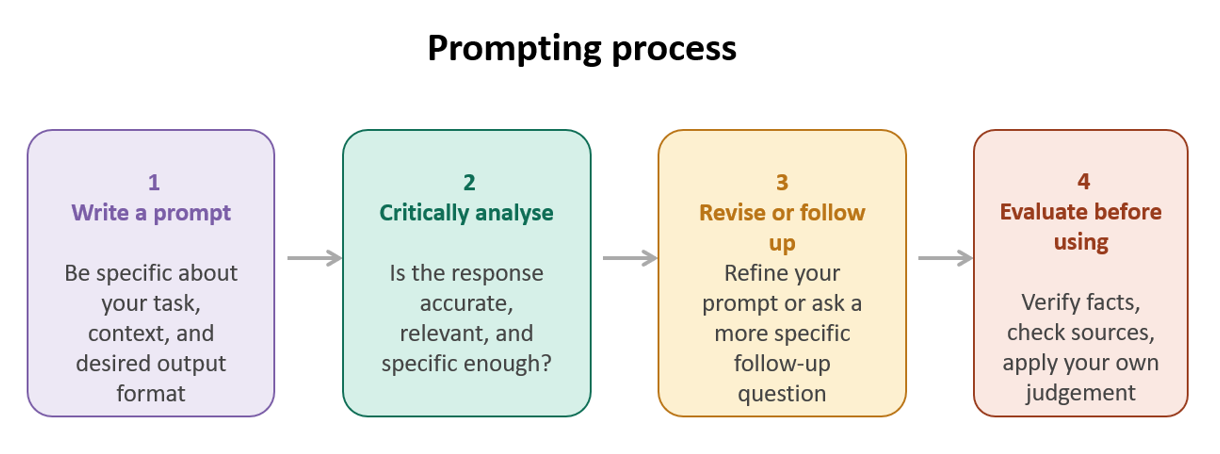
Prompting process
Working with AI is an iterative process, not a one-off query. The dialogic nature of AI prompting moves beyond simple “search and find” behaviour. Think of your first prompt as a starting point, you can critically assess the response, refine your prompt, and follow up to progressively improve the output.
Expand each task below to see a sample prompt and tips you can adapt for your own study.
Sample prompts for common study tasks
Use GenAI to build a realistic and personalised assessment plan to meet the deadlines.
Sample prompt: "I am a law student with three exams in four weeks. My exams are: Contract Law (Week 2), Evidence (Week 3), and Constitutional Law (Week 4). I have about two hours each weekday and four hours on weekends to study. Create a weekly study plan that spreads workload evenly, includes time for practice questions, and builds in two rest days per week. Present it as a table."
Tips:
- Include your actual deadlines and available hours if you want a detailed plan
- Ask it to build in rest days explicitly.
- Use follow-up prompt to personalise the plan: "Now adjust this plan …”
Use GenAI tools to understand concepts or theories by providing explanations, examples, or simplified summaries.
Sample prompt: "I am a second-year economics student, and I'm struggling to understand the concept of price elasticity of demand. Explain it to me as if I understand basic economics but haven't studied this topic yet. Use a concrete everyday example, like petrol or bread."
Tips:
- Specify your existing knowledge level, such as "as if I've never studied this" or "I know the basics."
- Ask for a real-world example to understand abstract ideas.
- Ask follow-up questions to deepen your understanding.
Use GenAI tools to generate practice questions and quizzes to test your understanding. You can explicitly state what topics and materials you want to focus on.
Sample prompt: “I am a first-year science student preparing for cell biology exam. Please create 10 multiple choice questions to help me prepare for the exam. Focus on membrane transport and the cell cycle. Do not show me the answer. Build the quiz based on my notes below [Insert note or other materials].”
Tips:
- Specify difficulty level and format of questions to match what you need to practice.
- Use follow-up prompts to create further questions and focus on the area you got wrong.
Use GenAI tools to support editing and proofreading by helping you identify gaps and providing feedback. However, you should use GenAI to guide and support your revision process, rather than relying on it to rewrite your work entirely.
Sample prompt: “Please review the paragraph below and identify gaps in the logic or places where my argument needs stronger connections. Provide the answer in columns. [Text]”
Tips:
- Be specific about what kind of feedback you want. For example, instead of asking “improve this”, ask AI tools to provide feedback on clarity, structure or grammar.
- Critically review the AI-generated suggestions.