
IT Services Help and Support Collaboration Tools
Collaboration Tools
- MRCMHR
- Future Students
- JCU Global Experience
- International Students
- Student experience
- Open Day
- How to apply
- Pathways to university
- Living on Campus
- Courses
- Publications
- Mature students
- Scholarships
- Entry options
- JCU Families
- JCU Heroes Programs
- Aboriginal and Torres Strait Islander in Marine Science
- Elite Athletes
- Defence
- Capability.Co
- AI@JCU
- AALL
- Current Students
- Student Ambassador Program
- New students
- JCU Orientation
- LearnJCU
- Placements
- EDQS
- Unicare Centre and Unicampus Kids
- Graduation
- Off-Campus Students
- JCU Job Ready
- Safety and Wellbeing
- JCU Prizes
- Professional Experience Placement
- Employability Edge
- Art of Academic Writing
- Art of Academic Editing
- Careers and Employability
- Health, Wellbeing and Belonging
- Career Ready Plan
- Careers at JCU
- Partners and Community
- School Outreach and Widening Participation
- Alumni
- International partnerships
- About JCU
- Reputation and Experience
- Chancellery
- Governance
- Celebrating 50 Years
- Academy
- Indigenous Engagement
- Education Division
- Research Festival
- Graduate Research School
- Research Division
- Research and Innovation Services
- CASE
- College of Business, Law and Governance
- College of Healthcare Sciences
- College of Medicine and Dentistry
- College of Science and Engineering
- MPE
- Anthropological Laboratory for Tropical Audiovisual Research (ALTAR)
- Rural Remote and Tropical Health Systems
- Agriculture Technology and Adoption Centre (AgTAC)
- Advanced Analytical Centre
- Australian Institute of Tropical Health and Medicine
- AMHHEC
- Aquaculture Solutions
- AMHRA
- JCU Digital Wellbeing Group
- ARCSTA
- Lions Marine Research Trust
- Australian Tropical Herbarium
- Australian Quantum & Classical Transport Physics Group
- Boating and Diving
- Clinical Psychedelic Research Lab
- Centre for Tropical Biosecurity
- Centre for Tropical Bioinformatics and Molecular Biology
- CITBA
- CMT
- Centre for Disaster Solutions
- CSTFA
- Cyclone Testing Station
- The Centre for Disaster Studies
- Daintree Rainforest Observatory
- Fletcherview
- JCU Eduquarium
- JCU Turtle Health Research
- MARFU
- Orpheus
- TESS
- JCU Ideas Lab
- CADSI
- CNL
- TARL
- eResearch
- Indigenous Education and Research Centre
- Past Course and Subject Handbooks
- Estate
- Work Health and Safety
- Staff
- Discover Nature at JCU
- Cyber Security Hub
- Association of Australian University Secretaries
- Services Division
- Environmental Research Complex [ERC]
- Foundation for Australian Literary Studies
- Gender Equity at JCU
- Give to JCU
- Indigenous Legal Needs Project
- Inherent Requirements
- IsoTropics Lab
-
IT Services
- Student IT Essentials
- Staff IT Essentials
- Help and Support
- Stay Informed
-
Secure IT
- Choosing a strong Password
- Cyber Security Hub
- Data Protection
- Device Security
- Email Safety
- Online Security at Home
- Web Safety
- Malware and Virus Protection
- Keep a clean device
- Protect myself from phishing
- Recover a hacked or compromised account
- Protect your digital reputation
- Report a cybersecurity incident
- Password Manager
- Multi-Factor Authentication (MFA)
- Student Systems
- IT Service Catalogue
- About
- VAVS Home
- JCU Webinars
- JCU Events
- JCU Motorsports
- JCU Sport
- Library
- Mabo Decision: 30 years on
- Marine Geophysics Laboratory
- Office of the Vice Chancellor and President
- Outstanding Alumni
- Policy
- PAHL
- Queensland Research Centre for Peripheral Vascular Disease
- Rapid Assessment Unit
- RDIM
- Researcher Development Portal
- Roderick Centre for Australian Literature and Creative Writing
- Contextual Science for Tropical Coastal Ecosystems
- State of the Tropics
- Strategic Procurement
- Student profiles
- SWIRLnet
- TREAD
- TropEco for Staff and Students
- TropCOVID: Mapping COVID-19 Immunity in Far North Queensland
- TUDLab
- VAVS Home
- WHOCC for Vector-borne & NTDs
- Media
- Copyright and Terms of Use
- Australian Institute of Tropical Health & Medicine
- JCU Respect
- Pay review
- Research
Take your teamwork to the next level with technology-based communication and collaboration tools at JCU. Streamline your work tasks, start a group chat, launch a site on the staff intranet, create an information repository, co-author files, share folders and work more collaboratively with your team. It's a new way to work and IT is here to help.
For more information about Collaborative Tools at JCU, these quick guides are a great place to start.
- Microsoft Teams (Available by request)
A one-point-of-access collaboration space, bringing together
people, documents, conversations, content and tools to make team collaboration easier.- Learn more: Introduction to Teams or Team Owners Guide and File Management for Teams
- Viva Engage (O365)
A corporate social networking platform, useful for sharing ideas.- Learn more: Introduction to Engage
- OneDrive for Business (O365)
Use OneDrive as your personal cloud storage, similar to having a personal filing cabinet in the cloud that you can selectively share with others. It contrasts this with SharePoint, which is intended for team collaboration and shared content.- Learn more:Quick Guide to OneDrive
- OneNote (O365)
A digital notebook allowing the capture of notes, drawings, pictures, meeting minutes, task lists etc.- Learn more: Quick Guide to OneNote
- Microsoft Whiteboard (available)Microsoft Whiteboard is a digital canvas where you create and share digital whiteboards as an individual or part of a collaborative team.
- Learn more: Microsoft Whiteboard
- SharePoint Communication Sites (Available by request)
A corporate intranet space that allows you to create and share content in a visually appealing format, for viewing by other JCU staff. Designed to broadcast information to groups, whole units or to an entire organization, Communication sites are fantastic tools for presentations, news, reports, staff events, and internal communications.- Learn more: Communication Sites at JCU
- Zoom (Available)
Video conferencing tool.- Learn more: Zoom Guide
Learn More: LinkedIn Learning has additional training resources.
What does your team hope to achieve or improve by using collaboration tools and what benefits would you like to see?
If you need help deciding which tool is right for your team, refer to the Collaboration Tools Feature List. Each collaboration tool has different features with different business benefits. Choose the tool that is right for you.
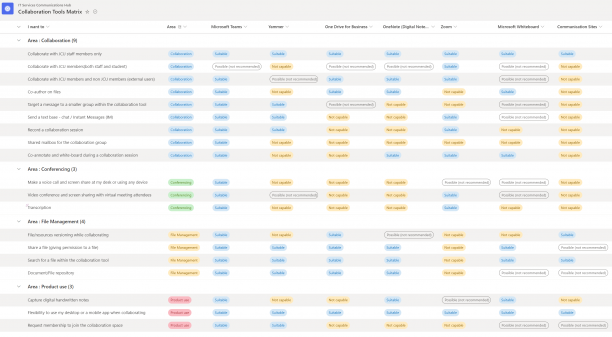
You may also find the Collaboration Tools user scenarios a useful comparison for reference. Please discuss the options available with IT Services and Support staff if you have any questions.
To apply for a collaboration space at JCU:
- Familiarise yourself with the available communication and collaboration tools.
- Log a job in the Service Portal (ServiceNow) via the Communication or Collaboration Tool Request form.
- An IT Service Delivery team member will contact you to discuss your business requirements and assess the appropriate tool/s to help you achieve the best outcome.
JCU has run successful Collaboration tools pilot programs with several Business areas. View the JCU user experience stories to see how these tools might help your team.
The Information and Space Planning unit (ISP) has tested Microsoft Teams and provided feedback about their experience.
Read.
Please log a job via JCU ServiceNow and one of our friendly IT Services and Support Staff can provide further assistance.